
TL;DR

Get gifts for the two of you delivered free with Prime
- Fast, free delivery on millions of items
- Prime Video, Amazon Music and more included
- Member-only deals all year
Prebuilt AI workstations can now match or beat custom builds on price, with advantages in thermal management, support, and time-to-deploy. The decision hinges on your workload needs, control preference, and risk appetite.
Build vs buy
an AI workstation.
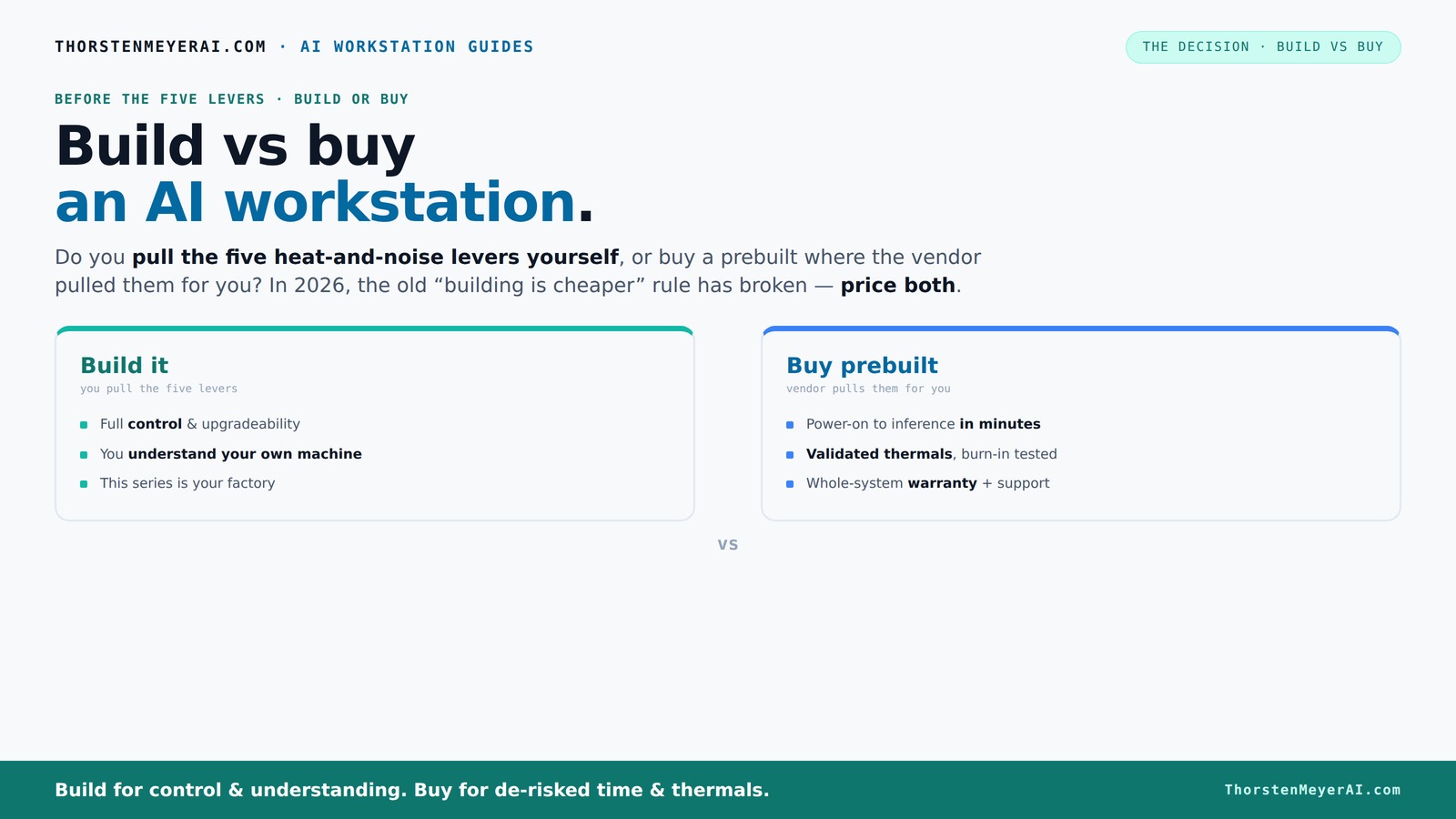
The real question behind this whole series: do you pull the five heat-and-noise levers yourself, or buy a prebuilt where the vendor pulled them for you? And in 2026, the old “building is cheaper” rule has broken. Match your situation in Part 3.
Key Takeaways
- Market shifts have made prebuilt AI workstations often cost-competitive or cheaper than DIY builds in 2026.
- Prebuilts include validated thermals, quiet operation, and support, reducing setup time and risk.
- Building offers maximum control, upgradeability, and customization, ideal for enthusiasts and long-term users.
- Power efficiency and thermal management are critical factors for sustained AI workloads—prebuilts often optimize these better out of the box.
- Evaluate your workload, budget, technical skill, and support needs before choosing between build or buy.
prebuilt AI workstation with high-performance GPU
As an affiliate, we earn on qualifying purchases.
As an affiliate, we earn on qualifying purchases.
Why the old rule—building is cheaper—no longer holds in 2026
Building your own AI workstation used to be the obvious choice for saving money. But recent market conditions flipped the script. Component shortages have driven up prices for GPUs, RAM, and SSDs. A build that cost under $1,000 a few years ago now easily hits $1,250+.
Meanwhile, big vendors like Dell, Lenovo, and custom shops bought in bulk before prices spiked. They can offer systems at prices that are often impossible to match when you buy parts piecemeal. The days of always saving money by building are over—at least for now.
That doesn’t mean prebuilt is *always* better—just that you need to price both options today for your specific setup. The tradeoff isn’t just cost; it’s time, thermal tuning, support, and future upgrades.
customizable AI workstation build kit
As an affiliate, we earn on qualifying purchases.
As an affiliate, we earn on qualifying purchases.
Who pulls the levers? Build your own or buy prebuilt?
Building your own rig means you get to control every detail—GPU choice, cooling, airflow, and even how quiet it is. You pull all five levers: undervolting the GPU, matching cooling solutions, optimizing airflow, tuning fans, and placing the system for best acoustics. It’s your factory.
Buying prebuilt shifts those levers to the vendor. They validate thermals, run stress tests, and often include water cooling for quieter operation. Systems from Lambda or BIZON are engineered to run cool and quiet under sustained AI loads, with warranties and support baked in.
So, the real question: do you want to tinker and learn, or pay to skip the hassle and get a tested, supported machine?
enterprise AI workstation prebuilt
As an affiliate, we earn on qualifying purchases.
As an affiliate, we earn on qualifying purchases.
When does a prebuilt make sense in 2026?
If your priority is instant deployment and minimal fuss, prebuilt is the way to go. Systems arrive ready with OS, AI frameworks, and drivers installed—just plug in and start training or inference. For busy professionals, this time-saving edge can be worth the extra cost.
Prebuilts also come with validated thermals and warranty support. If you’re running multi-GPU setups or high-end hardware, vendors optimize cooling and power delivery, minimizing your risk of thermal throttling or hardware failures.
And if your workload demands reliability—say, long training sessions or production inference—having a vendor handle the stress testing and warranty support adds peace of mind.
As an affiliate, we earn on qualifying purchases.
When does building your own system beat buying?
If you’re a hobbyist, researcher, or developer who loves fine-tuning, building offers unmatched control. You choose every component, from GPU to case, tailoring your rig to your specific needs. Want a whisper-quiet setup for content creation? You pick the cooling. Need extra VRAM for large models? You select the GPU.
Plus, if you enjoy the process, you learn more about your hardware, which helps troubleshoot or upgrade later. Building can also be cheaper if you already have some parts or want to avoid vendor markup.
However, beware of compatibility issues, assembly errors, or thermal misconfigurations. This route works best if you’re comfortable with the technical details.
Cost comparison: buying vs building today
| Aspect | Prebuilt System | DIY Build |
|---|---|---|
| Price range | $3,000–$6,000 for a high-end AI workstation | $2,800–$5,500, depending on parts |
| Support & warranty | Included, often 3-5 years, full support | Part warranties, self-support, no system warranty |
| Time to deploy | Minutes to hours | Several days to weeks |
| Customization | Limited, often proprietary parts | Full control over components and upgrades |
Performance, thermals, and noise: which matters most?
Prebuilt vendors tune thermals and airflow for optimal cooling, often resulting in quieter, more stable operation. They run stress tests, like burn-in cycles, to prevent throttling. For example, BIZON systems advertise up to 30% lower noise levels under load.
Building your own can match or beat this, but only if you tune everything perfectly. You choose cooling solutions—air or water—and adjust fan curves. It’s a satisfying challenge, but it takes time and knowledge.
In high-load AI tasks, thermal stability isn’t just comfort—it’s performance. Overheating can throttle your GPU, slowing training or inference. So, think about how much effort you want to put into thermal management.
Upgradeability and future-proofing: build or buy?
Building your own rig usually means more flexibility for future upgrades—adding RAM, swapping GPUs, or expanding storage. You can choose a case and motherboard that support the latest standards. For example, selecting a motherboard with PCIe 5.0 slots makes upgrading easier down the line.
Prebuilt systems often use proprietary parts or limited expansion options, making future upgrades tricky or costly. Some OEMs use custom connectors or non-standard layouts, forcing you to buy from them again.
If you plan to keep your system for several years or upgrade frequently, building might save you money and hassle later.
Support, warranty, and reliability: what’s the real difference?
Prebuilt systems come with support and warranties that cover the entire machine—often up to 5 years. If something breaks or overheats, you call support, and they fix it or replace parts. This is a big plus for those who want peace of mind during long AI training runs.
Building your own means relying on individual component warranties—your GPU, CPU, RAM—and troubleshooting on your own. While you gain control, you also take on the risk of compatibility issues or assembly errors.
For mission-critical workloads, the support and reliability of a prebuilt can save days of downtime and frustration.
Noise, power efficiency, and workstation ergonomics
Prebuilt vendors often optimize fan curves and cooling to keep noise levels low—think whisper-quiet under load. They also design airflow paths to reduce heat buildup, which prolongs component life.
Power efficiency is increasingly important, especially for AI workloads. Some AI-optimized systems deliver up to 41% less power consumption for the same task, reducing operational costs.
If you’re working long hours or in a shared space, noise and power efficiency matter. Building your own rig can match this, but only if you invest in quality cooling and carefully tune the system.
How AI software readiness influences your choice
Prebuilt systems often come with AI frameworks like CUDA, PyTorch, and TensorFlow preinstalled and tested. This reduces setup time and avoids driver conflicts. Dell’s AI PCs, for instance, offer optimized AI acceleration features that run efficiently out of the box.
Building your own requires installing and configuring everything yourself—drivers, libraries, dependencies. You might need extra time to troubleshoot compatibility issues, especially with cutting-edge hardware or software updates.
For quick deployment and minimal fuss, prebuilt is usually better. But if you love tinkering, building lets you customize the environment exactly how you want it.
What should you choose? Summary of the decision factors
If you need a reliable, ready-to-run system with support and warranty, prebuilt is your best bet. For maximum control, customization, and future expansion, building your own offers unmatched flexibility.
Think about your workload: Are you running long, intensive training sessions? Do you plan to upgrade components frequently? Is support a top priority? Your answers will guide your choice.
In 2026, the best decision depends on your specific needs—cost, time, expertise, and risk tolerance. The days of ‘build always cheaper’ are behind us, replaced by a nuanced tradeoff.
Frequently Asked Questions
Is a prebuilt AI workstation more expensive than building one?
Not necessarily. While prebuilts often come with a premium for support and convenience, recent market conditions have brought their prices closer to DIY options. It’s essential to compare specific configurations, as sometimes bulk buying can tip the scales.
Will a prebuilt be slower than a custom build?
Prebuilts are tuned for thermal and power efficiency, often resulting in comparable or better performance under sustained loads. They undergo rigorous testing, so they're less likely to throttle or overheat, which can slow down your work.
What specs matter most for AI work: GPU, VRAM, RAM, or CPU?
The GPU and VRAM are usually most critical for AI workloads, especially training large models. RAM supports multitasking and data handling, while CPU matters for data preprocessing and orchestration. Prioritize GPU and VRAM for raw AI performance.
Do prebuilts support future GPU or RAM upgrades?
Many prebuilts use proprietary connectors or limited expansion slots, which can complicate upgrades. If future expansion is a priority, building your own system with standard components offers more flexibility.
How much does warranty and support matter compared to component quality?
Support and warranty can save you days or weeks of downtime, especially during intensive AI tasks. While component quality is important, the peace of mind from professional support often outweighs minor differences in hardware specs.
Conclusion
In 2026, the decision to build or buy your AI workstation hinges on your priorities: speed, support, control, or cost. More than ever, it pays to compare real prices and consider what you value most—time or customization. Either way, your AI journey starts with choosing the right machine, not just the cheapest one.
Imagine a system humming quietly in your workspace, ready to tackle your next big project. Whether it’s built by your own hands or shipped ready to go, your focus should be on the work, not the hardware.
Fall Picks
fall essentials
As an affiliate, we earn on qualifying purchases.